Appendix F: Flying Vehicles
Appendix F Flying Vehicles
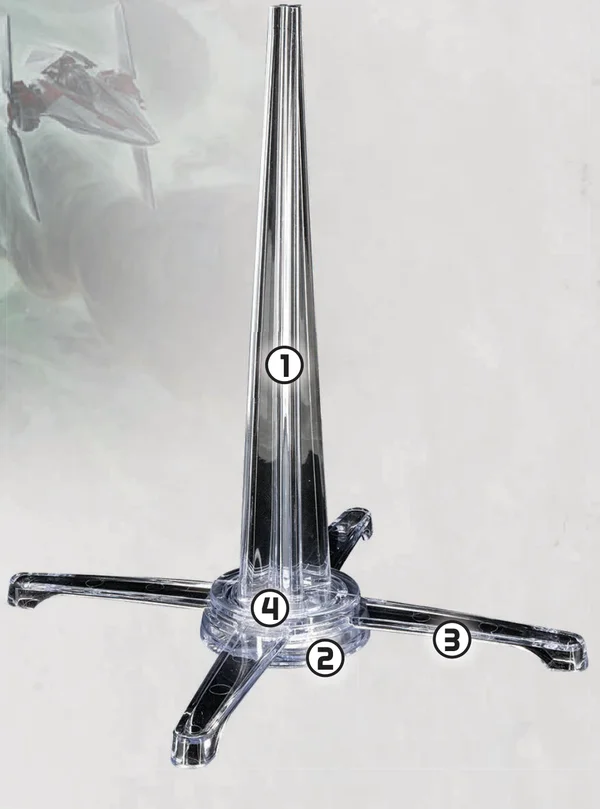
Parts of a Flying Vehicle Stand
- Stem: The part of the stand that attaches to the miniature and the base.
- Base: The circular part of the stand that connects the stem to the prongs.
- Prongs: The parts of the stand that protrude from the base and can rotate.
- Arcs: Markings on the base that break it into quarters.
Flying Vehicle Arcs
Each flying vehicle has 4 arcs marked on their base. These arcs are used for keywords like Fixed: Front/Sides/Rear and Weak Point X.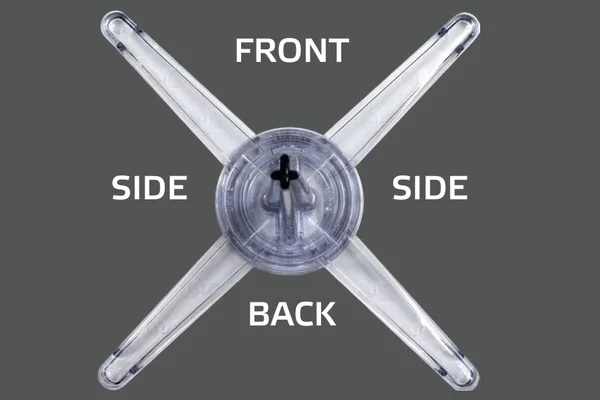
- Resolve any Abilities or Effects at the Start of a Unit's Activation
- Choose to Provide Air Support or Break Off
- Move (Cruising Move or Combat Move)
- Make Actions
- Resolve any Abilities or Effects at the End of a Unit's Activation and Assign Order token
Determining LOS and Measuring Range for Flying Vehicles
Flying Vehicles determine LOS and measure Range differently than other units.- Flying Vehicles do not block LOS, do not obscure miniatures, and do not provide Cover.
- Units always have LOS to Flying Vehicles.
- When determining if a Flying Vehicle has LOS to a unit, determine LOS by drawing an imaginary line from that Flying Vehicle’s stem instead of from its silhouette.
- When measuring Range to or from a Flying Vehicle, always measure from the closest point on the Flying Vehicle’s base, ignoring the prongs.
- When a non-Flying Vehicle unit adds weapons to an Attack Pool against a Flying Vehicle, reduce the Range of those weapons by 1. If this would make the Flying Vehicle out of Range, that weapon may not be added to the attack pool. Weapons with a maximum Range of
 do not reduce their maximum Range in this way.
- When a Flying Vehicle attacks another Flying Vehicle, its Ranged Weapons are always within Range, regardless of the weapon’s minimum and maximum Ranges.
Declare Battlefield Approach
At the start of the first Activation Phase, starting with the Blue Player, for each Flying Vehicle in their army, each player must declare that Flying Vehicle’s Battlefield Approach. Choose a short battlefield edge. When that Flying Vehicle Deploys, it must Deploy with a Cruising Move (see below) from the chosen battlefield edge.Additionally, each time a Flying Vehicle becomes undeployed, its controlling player must declare its Battlefield Approach.Cruising Speed and Combat Speed
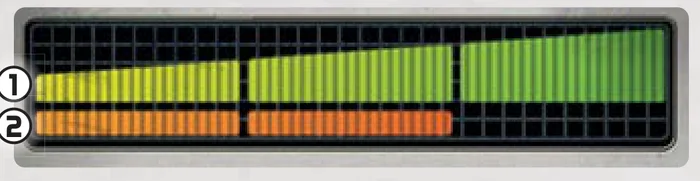
- Cruising Speed: The unit's Cruising Speed.
- Combat Speed: The unit’s Combat Speed.
- Resolve Abilities or Effects at Start of Activation Phase.
- Choose to Break Off or Provide Air Support. At the start of a Flying Vehicle’s Activation, it must choose to either Provide Air Support or to Break Off. A Flying Vehicle that is not on the battlefield must choose to Provide Air Support.
- Move. Flying Vehicles do not move like other units. Instead, they make Cruising Moves and Combat Moves. When a Flying Vehicle is put on the battlefield as part of a Move, its controlling player may rotate that Flying Vehicle's prongs to any position.
- Make Actions.
- Resolve any Abilities or Effects at the End of a Unit's Activation and Assign Order token.
Break Off
A Flying Vehicle that chooses to Break Off is removed from the battlefield and becomes undeployed. That Flying Vehicle's controlling player then declares its Battlefield Approach. When a Flying Vehicle Breaks Off during its Activation, it proceeds to the Resolve any Abilities or Effects at the End of a Unit's Activation step.When an allied Flying Vehicle Breaks Off, if your opponent controls 1 or more undeployed Flying Vehicles, the allied Flying Vehicle may make an Attack action against 1 of those undeployed Flying Vehicles before proceeding to the Resolve any Abilities or Effects at the End of a Unit's Activation step.Provide Air Support
A Flying Vehicle that provides Air Support proceeds to the Move step of its Activation.Moving Flying Vehicles
A Flying Vehicle cannot end a Move with any part of its flight stand overlapping other miniatures, non-area terrain, Objective tokens, or any battlefield edge.A Flying Vehicle may not end a Move or be placed in a position where the miniature would be physically unstable or fall over. If a Flying Vehicle cannot complete a Move for any reason, it immediately Breaks Off.Flying Vehicles cannot make Move Actions or Speed-X Moves.
Cruising Move
When a Flying Vehicle makes a Cruising Move, place a Range Tool with a number of segments equal to that Flying Vehicle’s Cruising Speed so that one end of the tool is flush with that Flying Vehicle’s base in its front arc and the other end of the tool is completely within its front arc. Then draw a line extending from the center of the Flying Vehicle’s base along that Range Tool to the battlefield edge. Finally, pick up the miniature and place it so that the centers of its front and back arcs are both along that line. When a Flying Vehicle is moved in this way, its base may not overlap the Range Tool used to measure the move. Finally, that Flying Vehicle may Pivot.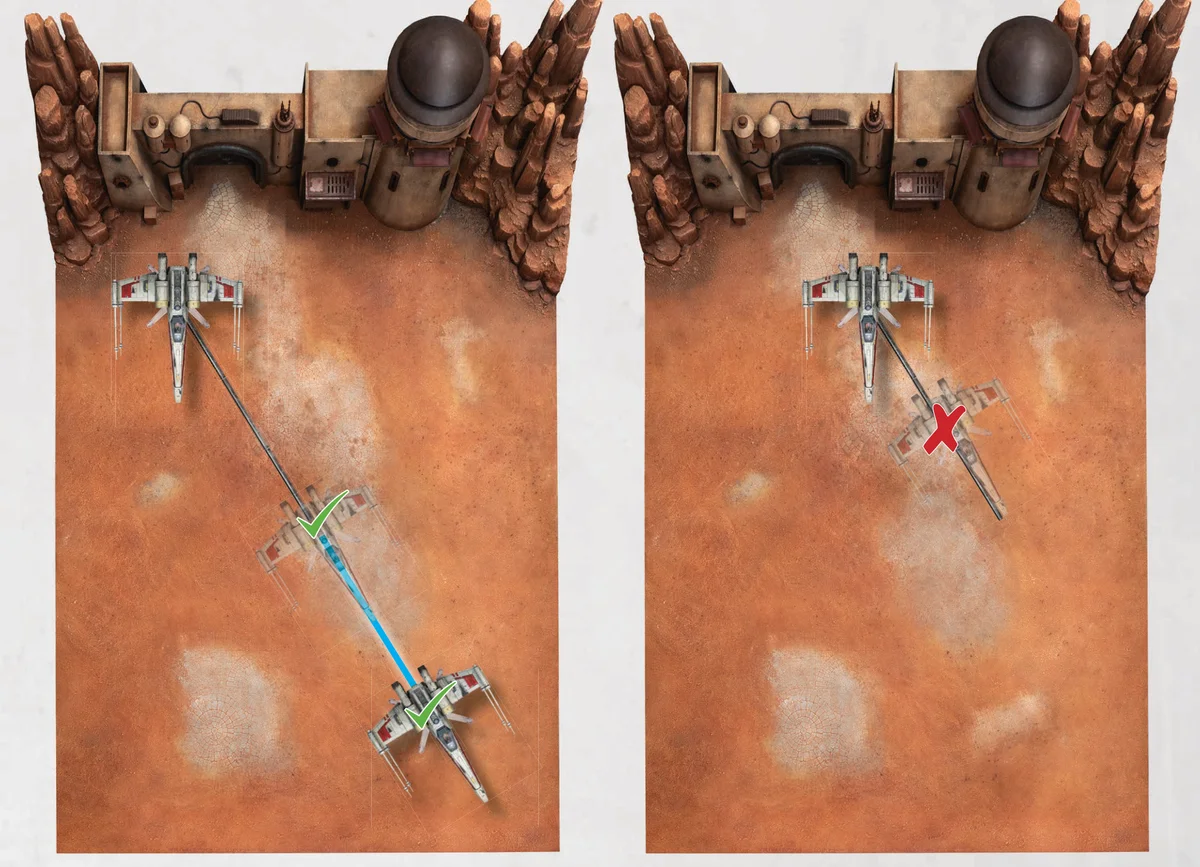
When a Flying Vehicle makes a Cruising Move or a Combat Move it may be placed any distance along the line drawn with the Range Tool as long as it is placed not overlapping that tool.
